Main Class:


package fig_12.pkg6;

import javax.swing.JFrame;

public class Fig_126

{

    public static void main(String[] args)

    {

       LabelFrame labelframe = new LabelFrame();

       labelframe.setDefaultCloseOperation(JFrame.EXIT_ON_CLOSE);

       labelframe.setSize(600,600);

       labelframe.setVisible(true);

    }


}


LabelFrame Class:


package fig_12.pkg6;


import java.awt.FlowLayout;

import javax.swing.JFrame;

import javax.swing.JLabel;

import javax.swing.SwingConstants;

import javax.swing.Icon;

import javax.swing.ImageIcon;


public class LabelFrame extends JFrame

{

    private final JLabel label1,label2,label3;


    public LabelFrame()

    {

        super("Testing Jlabel");

        setLayout(new FlowLayout());


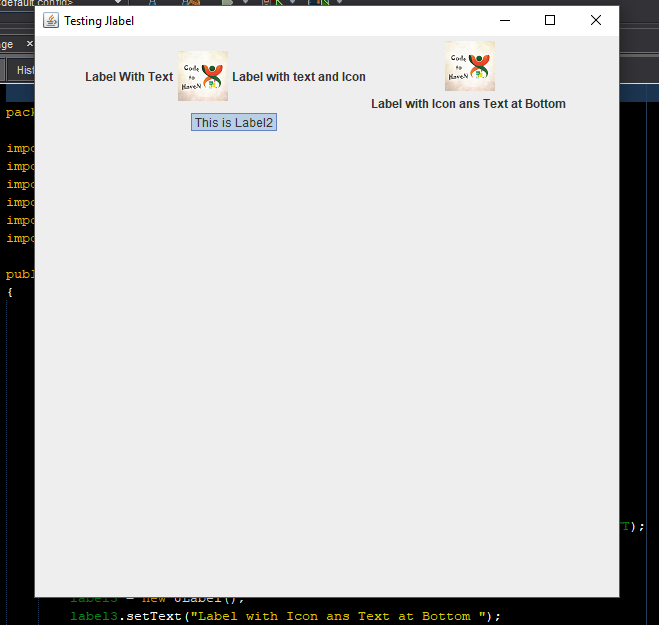
        label1= new JLabel("Label With Text");

        label1.setToolTipText("This is Label1");

        add(label1);


         Icon bug = new ImageIcon(getClass().getResource("abc.png"));///save this file where those code file saved in src folder

        label2 = new JLabel("Label with text and Icon",bug,SwingConstants.LEFT);

        label2.setToolTipText("This is Label2");

        add(label2);


        label3 = new JLabel();

        label3.setText("Label with Icon ans Text at Bottom ");

        label3.setIcon(bug);

        label3.setHorizontalTextPosition(SwingConstants.CENTER);

        label3.setVerticalTextPosition(SwingConstants.BOTTOM);

        label3.setToolTipText("This is Label3");

        add(label3);


    }

}
Output
Output:
Add your comment